Discrete manufacturing teams can waste considerable time figuring out what to do next instead of just doing it.
Replace confusion with clarity, and enhance efficiency, with an MES-embedded dispatching tool. The new Manufacturo Dispatching application puts the right work in front of the right people at the right time, based on calculated priority, with human override when needed.
This is not forward scheduling; it is real-time dispatching to keep work moving as reality on the floor changes and critical paths shift.
Instead of techs digging through work orders or pinging line managers for direction, Dispatching gives the whole team a single source of truth with a live view of what to run next and what’s at risk.
The efficiency gains you get with the Dispatching app on day one include:
- No need for manual dispatching of tasks and for high-use supervisors and leads
- Less time wasted asking "what should I work on next"
- Fewer ad hoc status calls and chat threads to coordinate work
- Earlier visibility into parts, document, and approval issues before they stall execution
- One consistent view of work for technicians, engineers, and line managers
The Dispatching Gap
Most teams have a work order system but run into the following process drag:
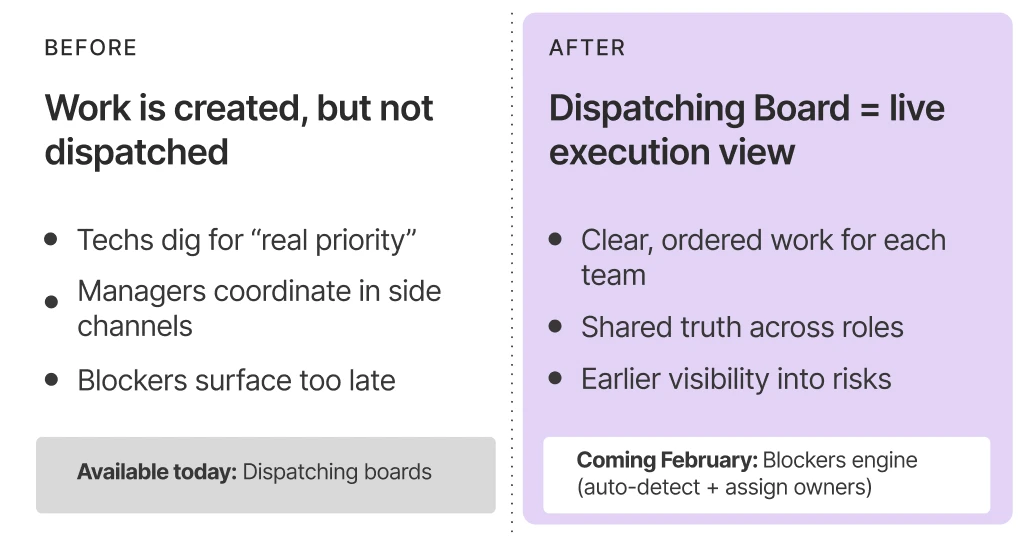
- Technicians searching through and cross-referencing work orders to understand which assignments are the real priority, or cherry picking the easiest operation to perform
- Supervisors using different tracking and communication systems to coordinate and task work
- Engineers relying on ad hoc requests to find work that needs redlines, approvals, or support
No single source of truth to identify work that is blocked due to inventory issues, missing documentation, or pending approvals
The Core Problem: Dispatch is manual and fragmented. Teams piece together the run order from work orders, spreadsheets, and side conversations, resulting in wasted time, idle WIP, and constant interruptions.
Manufacturo’s Solution: Manufacturo transforms dispatching from a disparate, time-wasting process into a shared operating view with real-time data and clear priorities.
Dispatching Board: Your Live View of Work, Organized Your Way
At the heart of the Dispatching app is a flexible, data-dense board that acts as a live dispatch console.
Create boards around how work actually runs
Boards can be configured to match your workflow and priorities. Common ways teams organize boards include:
- By work center, bench, or line
- By team, shift, or skill group
- By product, program, or customer
Benefit: Each team sees only the work that is relevant and actionable.
Make the board show what matters
- Choose the fields and status signals your operation needs
- Surface due dates, operation steps, ownership, and readiness in one view
- Reduce clicks and context switching to understand each job
Benefit: Faster decisions without the digging.
Keep work current and connected
- Keep WIP status current with barcode integration
- Pull work directly from Shop Floor Operations so priorities match the system of record
- Link into the underlying record in one click when details are needed
- Surface readiness and quality signals when needed, such as fully kitted vs. partial kitted, open kitting lines, and linked nonconformances
Benefit: A shared source of truth for what should happen right now, with a quick path to the details behind it.
Use calculated priority, with human override
- The system calculates a default priority so ordering is meaningful
- Leads can apply overrides when reality on the floor demands it
- Priority is global, so everyone works from the same priority signal even across role-specific views
- Priority can be derived from MRP want date (or due date) to generate a single global priority number
Benefit: Consistent execution focus, with flexibility when needed.
Find the right work fast
- Filter by work center, status, assignee, or any attribute you define
- Sort by priority, due date, or operational signals
- Search for a specific unit, order, or step in seconds
Benefit: Less time hunting - more time executing.
Who Benefits from Dispatching and How
Dispatching gives each operational role a real-time view of what work is ready, blocked, and most important.
Technicians
- See an ordered "run next" list, and not work waiting on parts, approvals, or changes
- Pick up work with all information needed to execute, including step details, required parts, and any approvals or holds
- Flag when something can't be worked so it can be unblocked
How they use boards: Typically one primary board for their cell or team.
Benefit: Fewer idle periods and fewer interruptions, more time building.
Engineers
- Get a prioritized queue of engineering actions required to unblock execution, such as redlines, approvals, dispositions, and mid-build engineering changes
- Focus on items holding up the critical path, not the loudest pings or the easiest wins
- Reduce coordination loops by working from an ordered queue of items waiting on engineering, with the exact reason they are blocked and a direct link to the record
How they use boards: An engineering-focused board that surfaces what needs attention first, tied to global priority and overrides.
Benefit: Time goes into clearing critical blockers, not searching for issues or chasing status.
Leads and Supervisors
- See what is ready vs. blocked and where work is piling up or at risk
- Optimize execution as conditions change with real-time data
- Stop managing the "happy path," and focus only on exceptions, overrides, or disruptions
- Coordinate parts and readiness faster by seeing what is missing, where it's needed, and what it is delaying
How they use boards: Often multiple boards to cross-reference status. For example, a supervisor managing several workbenches can keep a board per bench plus a roll-up view to track flow, readiness, and risk across all of them.
Benefit: Less time spent coordinating and acting as a detective, resulting in easier handovers, better utilization, and smoother flow.
Production Schedulers and Planners
- Work from a single source of truth for readiness and priority, instead of manual recalculation and disconnected spreadsheets
- Handle priority changes and overrides cleanly as conditions shift across the factory
- Focus on exceptions and constraints, not constant rescheduling churn
How they use boards: Broad, roll-up boards that show priority, readiness, and downstream impact across teams and areas.
Benefit: Better dispatch decisions with far less manual effort, and fewer surprises reaching the floor.
Material Handlers and Expediters
- Know what to kit or deliver first based on what will unlock the most important ready-to-run work
- Avoid unnecessary pulls and line-side deliveries by skipping jobs that cannot run yet.
- Improve timing and accuracy by seeing where each job is in the process and what material, kit, or move is needed next.
How they use boards: Boards filtered to "deliver-first" needs by area, program, or work center - often cross-referenced with readiness signals.
Benefit: Right parts, right place, right time - with fewer fire drills and fewer stalled jobs.
Available Today: Dispatching with Manual Blocker Visibility
The Dispatching app is live and ready to use now. Out of the box, teams can:
- Use configurable boards to centralize work in the way that fits operations. For example, by line, work center, bench, team, program, or other attributes
- Prioritize and re-prioritize work in a controlled way (with global priority and human override)
- Assign and reassign tasks based on real-time capacity and skill coverage, or let technicians pick up work from a prioritized queue
- Filter and sort to surface risks and potential blockers (e.g., jobs waiting on parts, approvals, nonconformance holds, redlines not released, predecessor operations not closed, or parts not at location)
Because Manufacturo has integrated Inventory and Quality, Dispatching reflects readiness in addition to simple status fields and shows work as actionable only when materials are kitted and no quality holds or defects block execution.
Benefit: This turns work order data into an actionable execution view, so teams can quickly understand what should run next and where it should run as the critical path changes.
Coming Soon: Configurable Blockers Engine
The next major step for Dispatching is a dedicated blockers engine, targeted for release later in Q1. Instead of identifying what is blocking work by manually sorting the database, the app will automatically identify and track blockers, and task it to people responsible for unblocking it.
System defined blockers
The blockers engine will ship with system-defined blockers for common conditions such as:
- Part shortage
- Part unavailable in stock
- No purchase order for a required part
- No upstream work order producing the part
- Pending approval or review
The result: Each system blocker type is owned, so you see what is stuck and who clears it.
Customer defined blockers
Not every constraint is driven purely by system data. Teams will also be able to define their own blocker types, for example:
- A customer rule that prevents using specific inventory
- Missing or incomplete documentation required to proceed
The result: For each custom blocker type, you define the owner, so blockers mirror how your operation actually runs.
Blocker management, at a glance
The blockers engine will introduce:
- A dedicated Blocker Management screen for identifying blockers, assigning ownership (ME/QE, Buyer, etc.), and clearing them quickly
- Clear categories of blockers visible on the main board view
- Blockers assigned by person and role, so nothing falls through the cracks
The result: The board will show what is in the queue, and what is blocked, why, and who needs to move first.
The blockers engine will be ready out of the box with:
- System-defined blockers calculated directly in Dispatching based on data already in the system
- Customer-defined blockers that depend on the customer's data and rules - if the system has the data, it can calculate whether the blocker exists
- Custom blockers created via integrator background jobs (or async triggers) using customer scripts, and through a Public API to create and delete blockers
Improving Efficiency on Your Shop Floor
With Dispatching available today and the blockers engine coming soon, you get a single control point to coordinate work, reduce idle time, and keep the whole team aligned on the critical path.
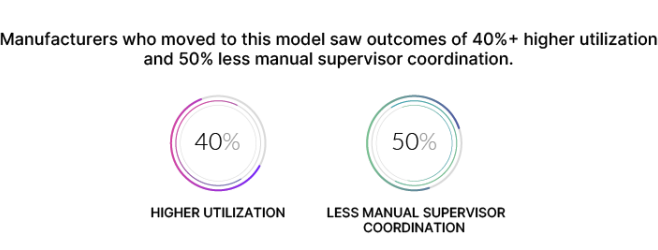
This approach is so productivity-boosting that other high-complexity manufacturers who moved to this model saw outcomes of 40%+ higher utilization and 50% less manual supervisor coordination.
See for yourself how our Dispatching app can fit into your shop floor. Reach out to the Manufacturo team for a demo of our platform.

See for yourself how our Dispatching app can fit into your shop floor.