







Nonconformance Management Software for complex manufacturing
Find a defect, lock it down, and resolve it with a record auditors can follow.
Manufacturo Nonconformance Management is nonconformance management software built into the manufacturing execution system (MES) that runs your production. It ties every NCR to the exact piece of hardware it affects, blocks that hardware from moving forward until it’s dispositioned, and connects the fix to the root cause so the same defect doesn’t come back.
How Manufacturo Nonconformance Management works
Every NCR is tied to the exact piece of hardware it affects. From there, control and the fix run in parallel.

What is nonconformance management?
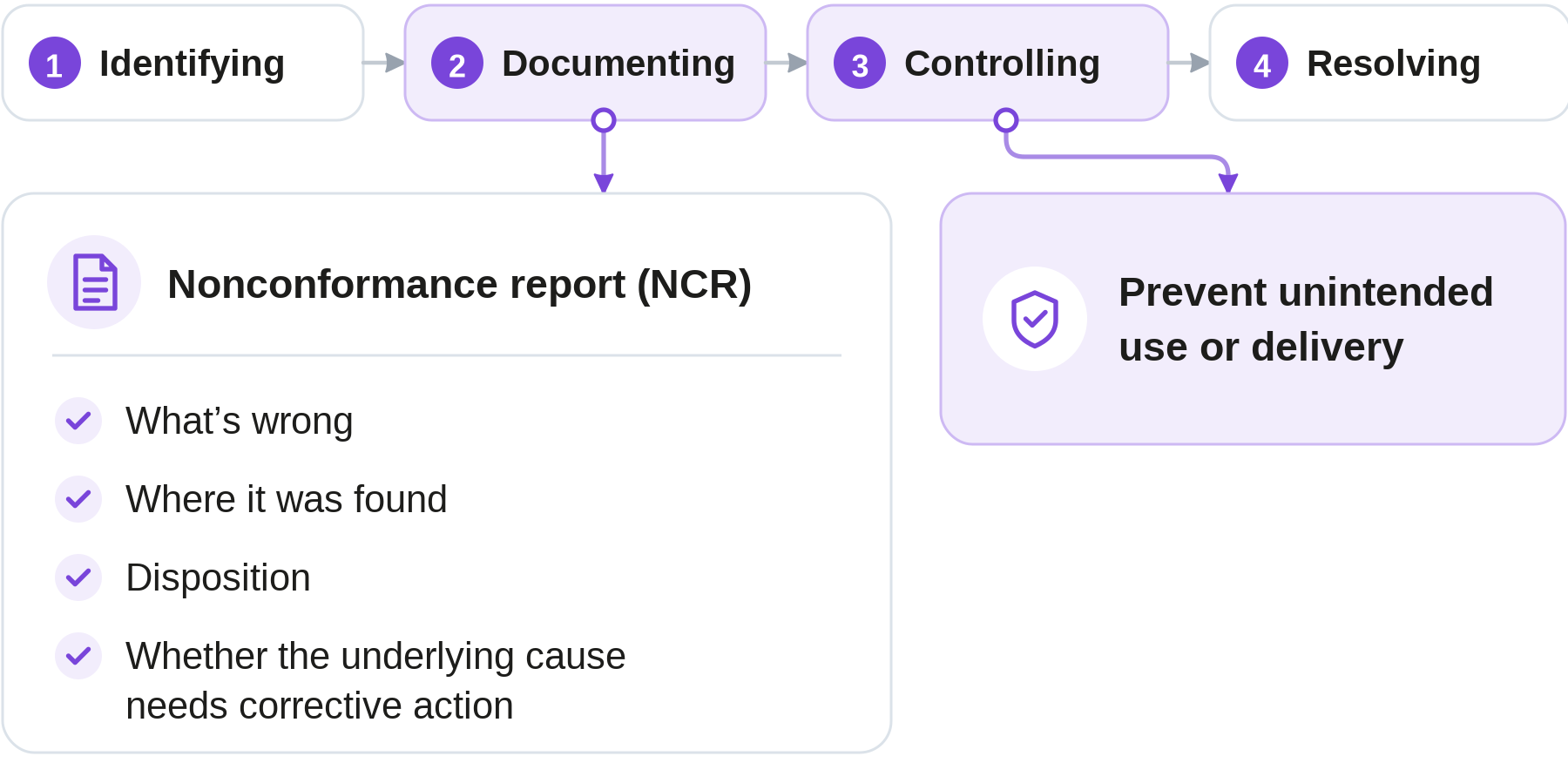
Nonconformance management (also written non-conformance or non conformance management) is the process of identifying, documenting, controlling, and resolving products or materials that don't meet their specified requirements. A nonconformance can be any deviation from a drawing, specification, tolerance, or procedure. Typical examples are an out-of-tolerance dimension, a damaged component, or a supplier part that fails receiving inspection.
Each nonconformance is usually documented in a nonconformance report (NCR). The NCR records what’s wrong, where it was found, and what will happen to the affected hardware (the disposition). It also records whether the underlying cause needs corrective action.
Both ISO 9001 and AS9100 require it. Clause 8.7 (Control of nonconforming outputs) says nonconforming product must be identified and controlled to prevent its unintended use or delivery.
Why nonconformance control matters in regulated manufacturing
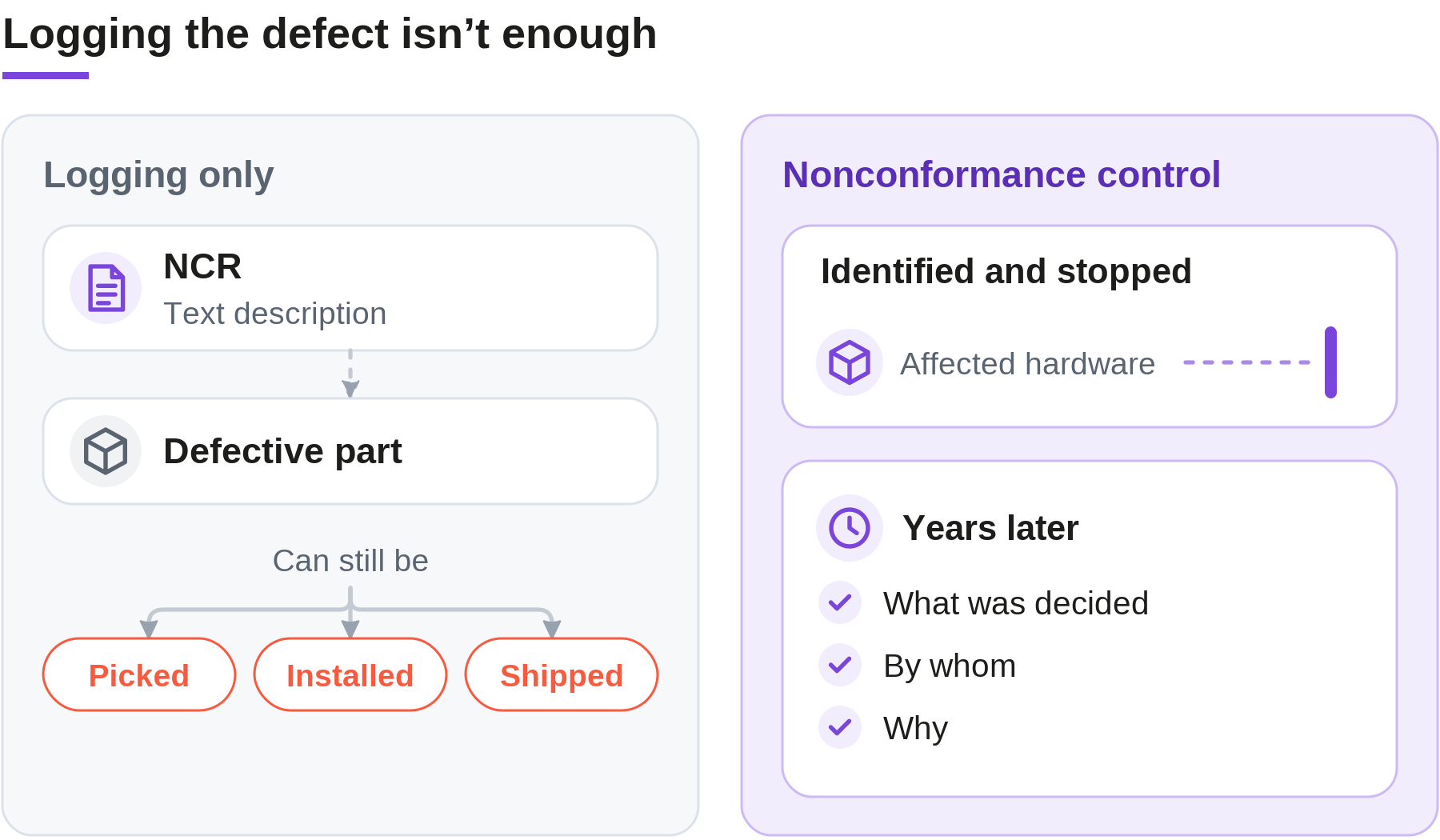
In aerospace, defense, space, new energy, and nuclear manufacturing, one escaped nonconformance can mean a safety risk in the field, a scrapped assembly, damaged machines or tooling, or a failed audit. Logging the defect isn't enough: the affected hardware has to be identified and stopped. Manufacturers also need to prove, years later, what was decided, by whom, and why.
That’s hard to do when the quality system sits next to production instead of inside it. In many QMS tools, an NCR is just a ticket with a text description. The defective part itself can still be picked, installed, or shipped.
The nonconformance process, step by step
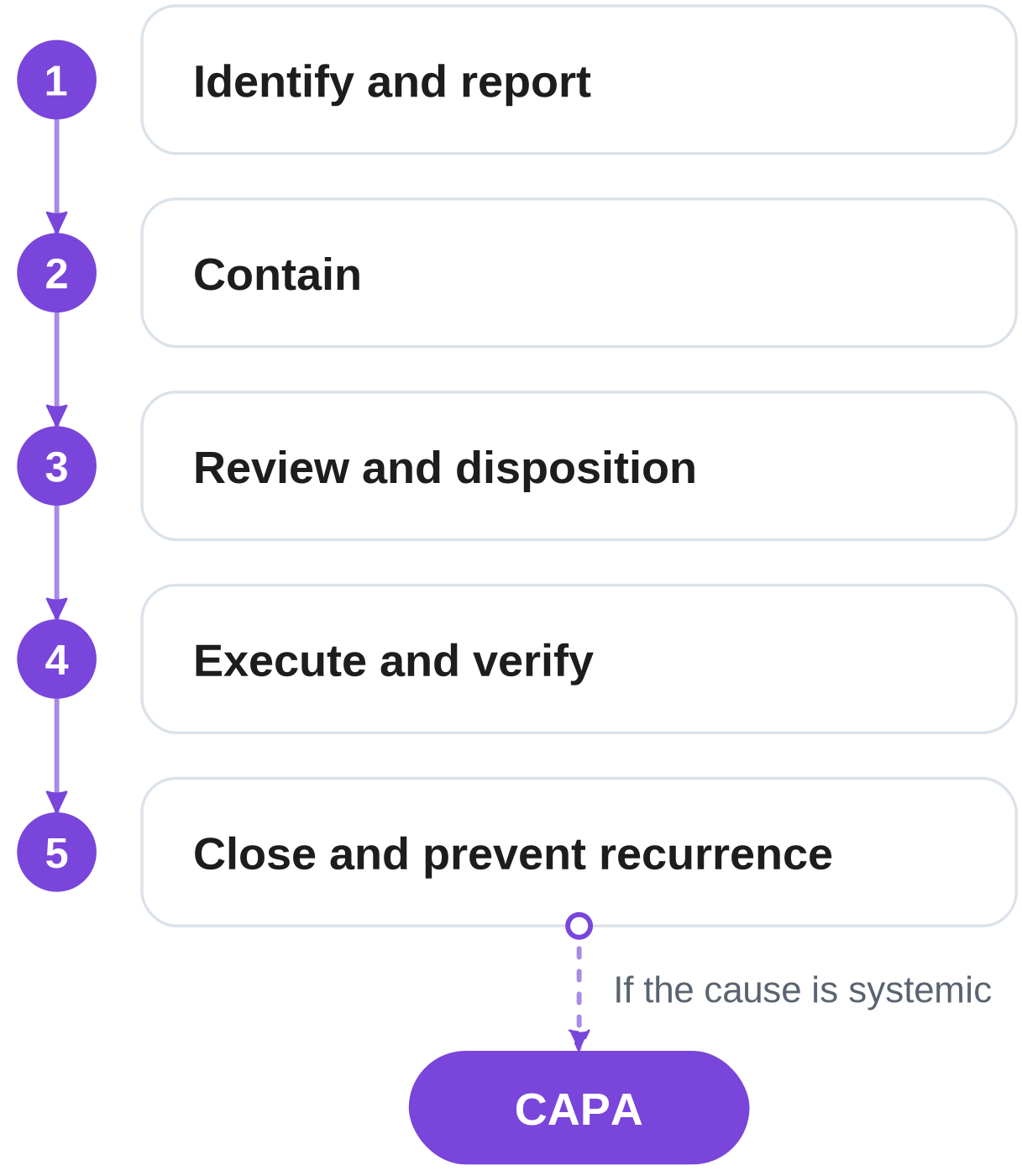
A well-run nonconformance process follows five stages:
- Identify and report. Anyone who spots a defect or suspect hardware documents it, whether on the shop floor, in inventory, at receiving inspection, or in a notice from a supplier.
- Contain. The affected hardware is physically segregated and labeled. It’s blocked in the system so it can’t be used, installed, or shipped.
- Review and disposition. Quality, manufacturing, and design engineers decide what to do with the hardware, often through a Material Review Board (MRB). Common dispositions include use-as-is, rework to print, repair, retest, return to vendor, downgrade, and scrap.
- Execute and verify. The rework or repair is carried out, documented, and verified.
- Close and prevent recurrence. The condition is closed. If the cause is systemic, it’s handed off to a corrective and preventive action (CAPA) process.
How Manufacturo manages nonconformances
Manufacturo manages nonconformances inside the same platform that runs production: every NC is tied to a specific serial number or iTag, Must Resolve By controls block that hardware until it's dispositioned, and systemic causes go to a CAPA project.
Traceability down to the individual piece of hardware
Every nonconformance is reported against specific hardware: the product, serial number, and iTag. If you split a lot of 1,000 units into 100 lots of 10, each lot gets its own iTag that can be controlled independently. You can raise an NC on a top-level assembly or on individual components already installed in it.
Open nonconformances are visible wherever people make decisions:
- on the work order, broken down by operation and step
- in inventory, with blocked status, assignee, and disposition
- in Dispatching
- in Impact Assessment
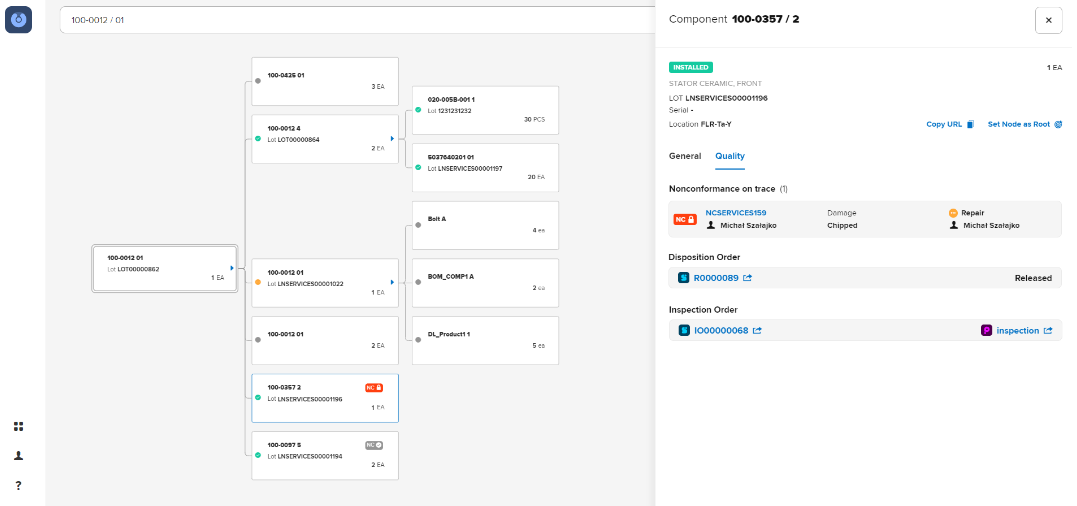
- in One View, which shows every NC across an assembly’s full genealogy
Engineers responsible for a build can review all quality issues for the whole product in one place.
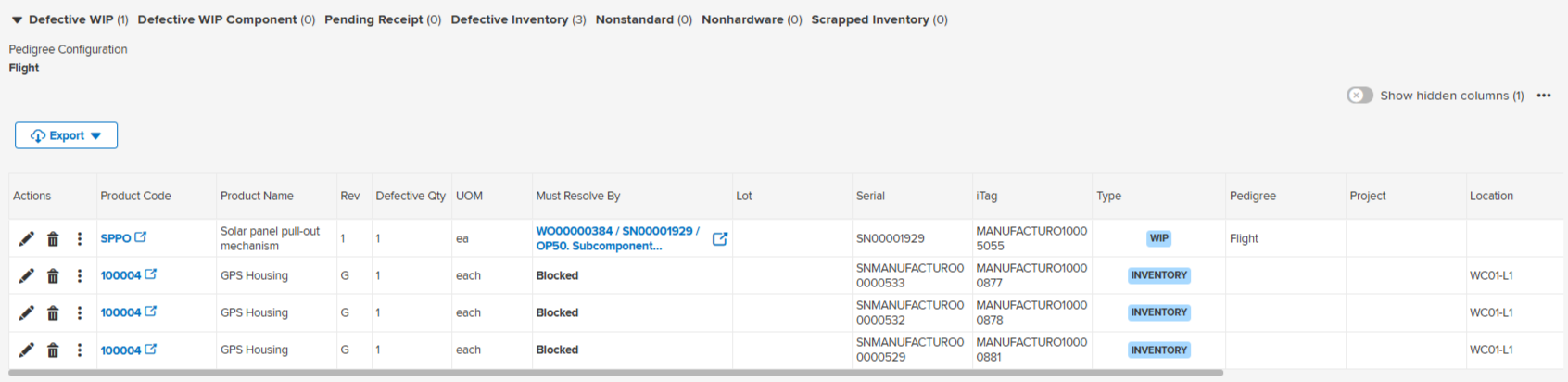
Must Resolve By: control that stops escapes
Creating an NC activates control immediately. With Must Resolve By, you can do either of the following:
- Block inventory so suspect hardware can’t be picked, installed, or shipped.
- Block completion of a specific work order step, so production stops before the operation where the defect would cause scrap or damage machines and tooling.
A single NC can carry multiple Must Resolve By controls, gating several steps at once. The control stays active until the condition is closed.
Integrated data collection lets you enforce control over out-of-limit measurements, with the recorded values linked directly to the NC condition. Printed NC labels support the physical segregation and identification your quality standards require.
Structured data instead of free text
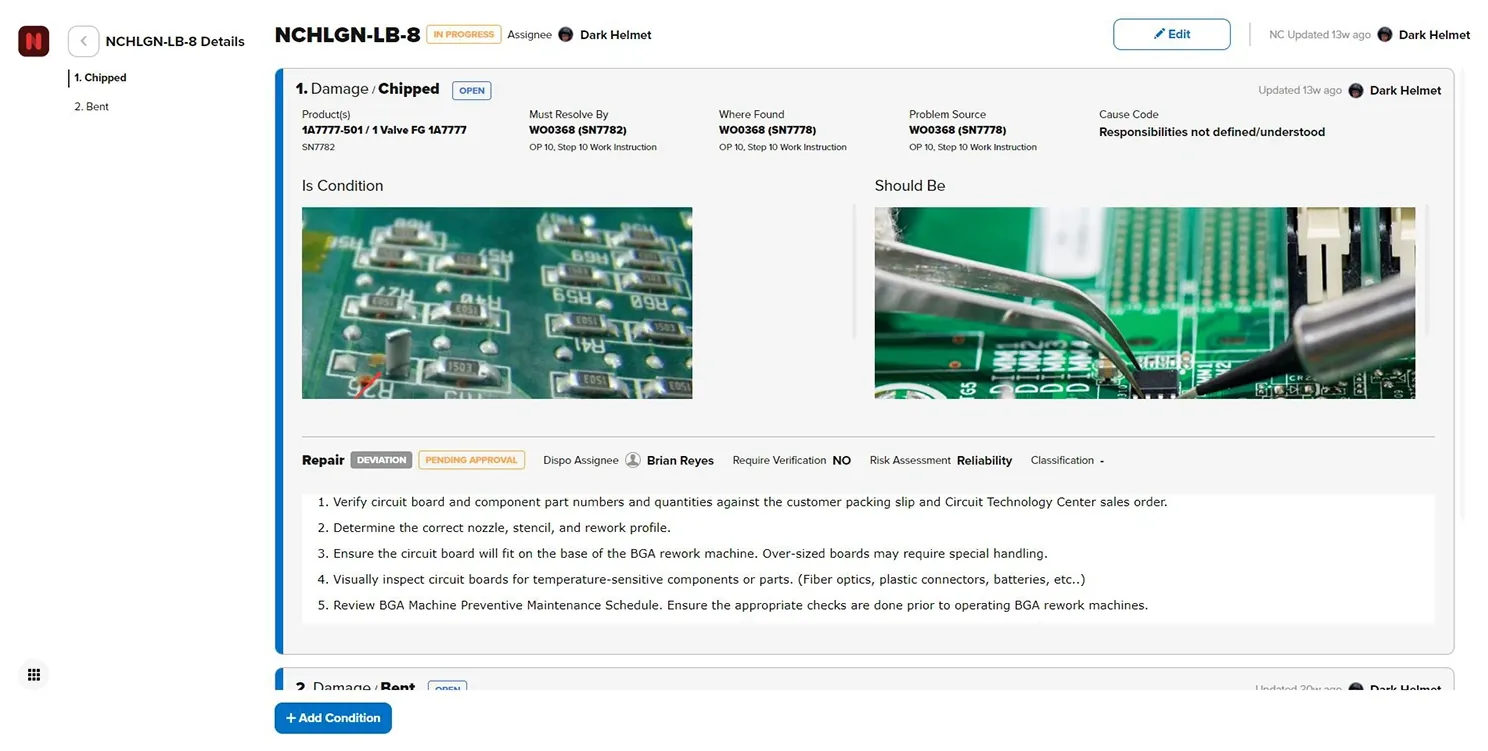
Each NC condition captures one specific deviation from specification in structured fields:

Where found
the work order step, batch step, inventory location, work center, or purchase order line where the defect was discovered.

Problem source
where the defect actually originated, such as a supplier. This makes supplier quality metrics possible.

Reject category and code
a customer-defined classification, for example mechanical damage or out of tolerance.

Cause code
a structured classification of the root cause.

Is / should be condition
the current state versus the specification, supported by photos, videos, PDFs, spreadsheets, linked NCs, and external references.
Because every input is structured, you can build dashboards, track trends by product or defect type, and create custom reports in Reporting. Any NC can also be exported to PDF.
Disposition workflows configured to your risk
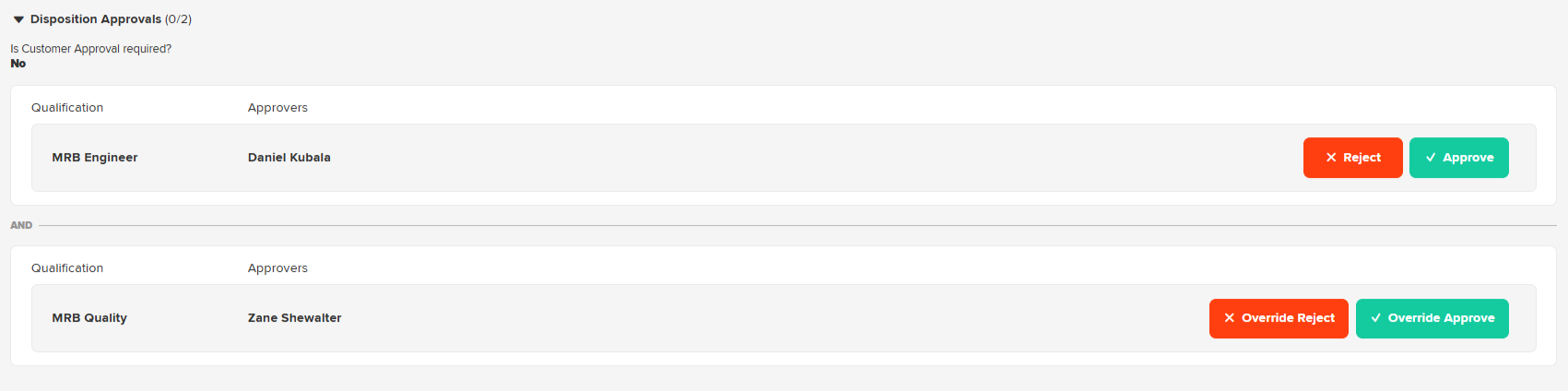
A low-risk prototype part shouldn’t need the same engineering review as flight hardware. Manufacturo’s disposition workflow is configurable per disposition type and per pedigree. That covers required fields, whether a risk assessment is needed, and who must approve.
- Risk-based approvals. A risk assessment or a specific reject code can trigger elevated approval requirements automatically.
- Customer proxy approval. Deviation dispositions, such as a repair that doesn’t return the part to its original spec, can require formal customer acceptance (a waiver).
- Design authority sign-off. Dispositions that could affect product characteristics can require approval from design or MRB engineers.
- Pedigree downgrade. Hardware that’s out of tolerance for flight can be downgraded to a lower pedigree, such as prototype, where it still conforms.
- Evaluation dispositions. Gather more data, like additional tests or supplier analysis, before deciding.
- Controlled closure. Restrict who can close a condition, for example, only a qualified reliability engineer for flight pedigree.
Granular permissions let every role contribute without taking on decisions outside their authority. This way, you can match the process to your organization’s maturity and your industry’s requirements, and engineering time goes where the risk actually is.

Disposition and inspection integrated with the shop floor
Rework and repair aren’t tracked in a side document. They run as disposition operations inside your production workflow.
The planner adds the rework operation to the operation diagram and decides when it happens, either now or later in the process. The planner can also place the Must Resolve By control directly after it. Technicians see the operation in execution like any other work. Approvals, changes, and closure remain governed by the NC workflow.
The same integration covers receiving inspection. Anything that fails inspection can be blocked in inventory immediately. You can also raise NCs for supplier-reported defects before the parts arrive, so they’re automatically controlled at receiving.
Root cause: CAPA and NC Further Actions
Dealing with a defective part and dealing with the cause of the defect are two different jobs, and Manufacturo keeps them separate.
When closing a condition, you decide whether the problem is systemic:
- Systemic issues go to an integrated CAPA project for root cause analysis and corrective and preventive actions.
- Non-systemic issues can still be addressed through NC Further Actions, such as updating a work instruction. These are assigned to an owner with a due date and tracked in Action Boards. Each action links back to its NC, so teams can see every open action across an assembly and close the loop.
A complete audit trail
Manufacturo logs every change to every NC field: what changed, the previous value, who made the change, and when. That record covers what ISO 9001 and AS9100 clause 8.7.2 ask you to retain: a description of the nonconformity, the actions taken, any concessions obtained, and the authority that decided the action. Nonconformance Management gives you the full history of each defective item, from creation through disposition, execution, and closure.

Who uses Nonconformance Management
Manufacturo Nonconformance Management lets anyone in your organization report a defect, including suspect hardware, and gives each quality and engineering role its own part of the NC workflow:

Technicians and operators
who report defects directly from the shop floor and execute rework.

Quality inspectors
who verify dispositions and support containment.

Quality and supplier quality engineers
who own NC areas and track supplier performance.

Manufacturing engineers
who plan rework and repair dispositions.

Design, reliability, and MRB engineers
who approve dispositions that affect product characteristics and review all NCs for a build in One View.

Production and quality managers
who need to see which NCs are blocking work and where defects trend.
From fixing defects to preventing them
Every rework, repair, and scrap is a cost of poor quality, measured in materials, machine time, and engineering hours. Quality management in regulated manufacturing will never be free, but you can choose where that cost goes.
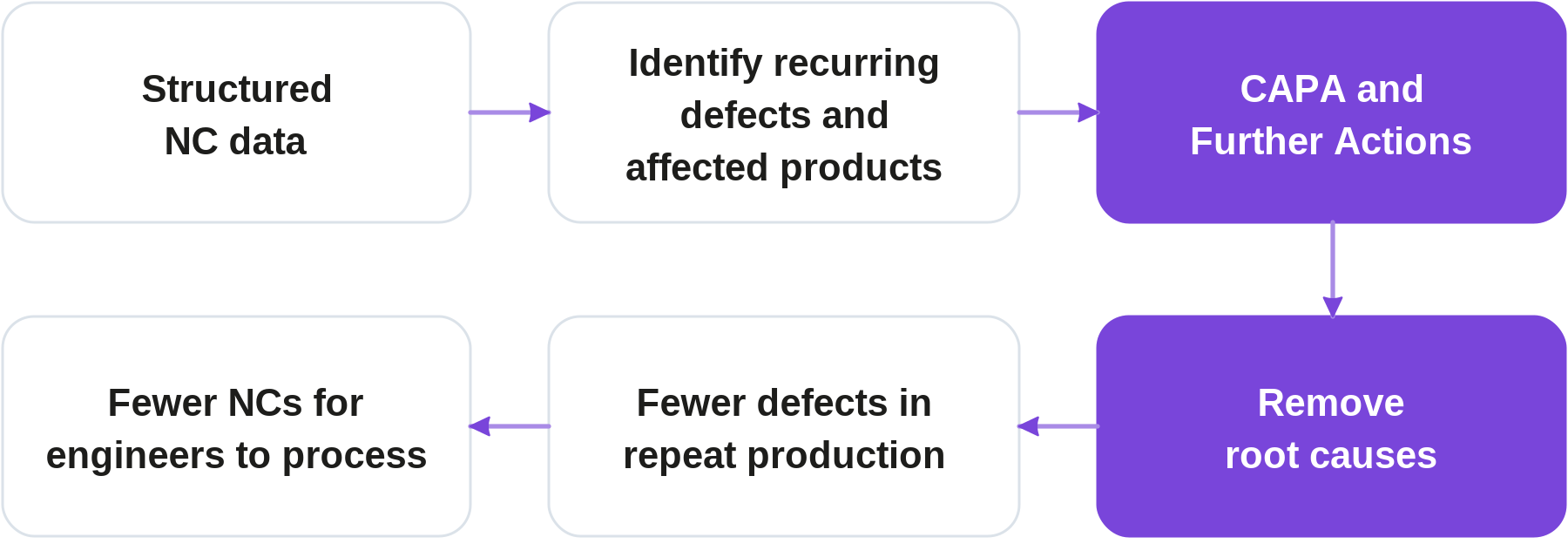
With structured NC data, you can see which defects repeat, on which products, and why. With CAPA and Further Actions built in, you can act on those causes. Over time, investment shifts from fixing defects toward preventing them. The biggest gains come in repeat production, where removing one root cause prevents the same defect on every unit that follows. Fewer defects also means fewer NCs for engineers to process.
See how Manufacturo controls nonconforming hardware
Frequently asked questions
A nonconformance report (NCR) documents a product, material, or process that doesn’t meet its requirements. It records the deviation, where it was found, the affected hardware, the disposition, and any follow-up actions.
An MRB is a cross-functional group, typically quality, engineering, and design, that reviews nonconforming hardware and decides its disposition. MRB approval is often required for dispositions like use-as-is or repair.
Common dispositions include use-as-is, rework to print, repair, retest, return to vendor, downgrade, scrap, and no defect found. Dispositions that leave a part outside its original specification, such as use-as-is or repair, are usually called deviations and may require customer approval.
A typical nonconformance is a machined part measured out of tolerance, a component damaged during handling, or a supplier part that fails receiving inspection. Each one is recorded in an NCR, contained by blocking the affected hardware, and dispositioned, for example as rework, return to vendor, or scrap.
Yes. Nonconformance, non-conformance, and non conformance are spellings of the same term: a product, material, or process that doesn't meet its specified requirements. ISO 9001 uses "nonconformity" for the general concept and "nonconforming outputs" in clause 8.7.
Nonconformance management deals with the specific defective hardware: contain it, decide what to do with it, and execute that decision. CAPA addresses the underlying cause so the defect doesn’t recur. In Manufacturo, the two are connected, and systemic NCs can be routed directly into a CAPA project.

Software alone doesn’t make a company compliant, because certification depends on your entire quality management system. Manufacturo supports the AS9100 and ISO 9001 requirements for controlling nonconforming outputs through identification, containment, controlled disposition, and a complete audit trail.