









Material Requirements Planning (MRP)
Your Factory’s Central Nervous System
Manufacturo’s MRP app answers a critical question: Do you have what you need, when you need it, to deliver on time?
By comparing demand from your Master Schedule with available supply—across every BOM level, Site, Pedigree and Project—Manufacturo transforms disconnected data into a single, actionable plan. It continuously aligns product configurations, lead times, and inventory with production schedules to keep your operation in sync.
With dynamic recalculations, centralized control, and full integration across planning and execution, the MRP engine helps teams prevent shortages, reduce delays, and optimize procurement and production.

The Risk of Disconnected Planning
Without a unified MRP system, manufacturers face:
- Inventory shortages or excess due to outdated or fragmented data
- Inaccurate schedules that delay production or inflate procurement
- Static planning that fails to adjust for BOM changes or demand shifts
- No visibility into multilevel assemblies, dependencies, or true material readiness

Key Features of the MRP App

Dynamic Demand Planning
- Compare the Master Schedule demand to real-time supply
- Plan multilevel assemblies and generate Clear-To-Build indicators
- Include Safety Stock calculations where required
- Ensure every Purchase Order will include the Re-Order points

Live Master Schedule Control
- Build, and adjust Master Schedules across Products, Projects, or Sites
- Configure by due date, quantity, Pedigree, Customer and Project
- Built-in validation prevents errors like circular references

Data-Driven Procurement & Work Order Generation
- Automatically generate planned Work Orders and Purchase Orders based on inventory, lead times, Safety Stocks and Re-Order points
- Include BOM substitutes and delay tolerances in each run
- Optional future support for dynamic lead time updates via API

Smart MRP Run Engine
- Run calculations by Site, Pedigree, Project, or debug mode in seconds
- Exclude inactive or misconfigured products without halting the run
- Supports simulation and iterative planning based on make/buy logic
- Exclude selected Inventory Locations from the MRP Run

Control Tower Reporting
- Visualize demand status, dependencies, and production readiness
- Drill into suggested actions by Product, Pedigree, or Project
- Easily track open actions and prioritize material releases
- Chech the fulfillment by each Project
- Analyze all BOM levels demand to ensure you are ready to release the Work or Purchase Order
- Check the MRP health and fix issues that may affect the MRP Run
- Verify Orphan Inventory, Purchase and Work orders to avoid unnecessary effort
Why Choose Manufacturo for MRP

Speed and Accuracy
Lightning-fast planning with real-time data
Configurable Logic
Tailor lead times, Safety Stock, Re-Order points and procurement rules

Traceability by Design
Pedigree-aware from the start

Seamless MES Integration
Full connection to Product Master Data, Shopfloor, Inventory, including Work and Purchase Orders

Future-Proof Architecture
Open to API-based enhancements like auto-updating lead times, default BOMs as well as other MRP-related attributes
The Central Nervous System
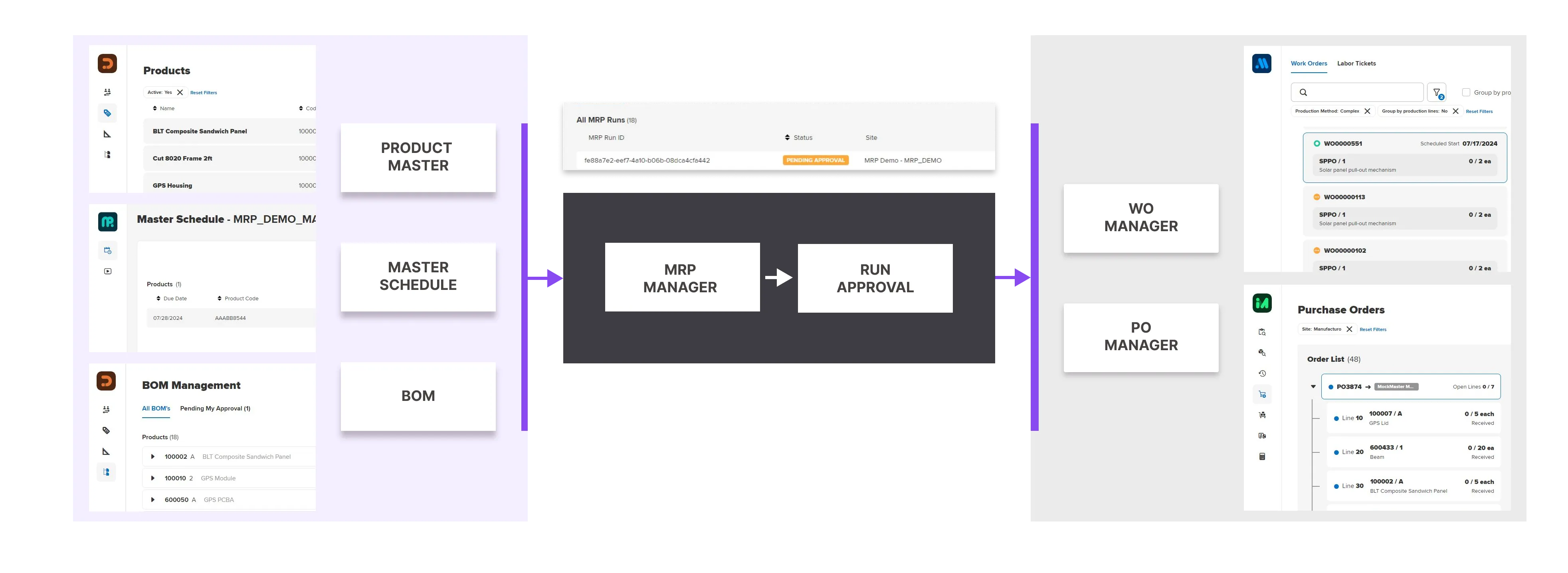
MRP connects the full digital thread: BOMs, product master data, inventory status, and scheduling—into one unified, dynamic plan that flows directly into Work Order and Purchase Order execution. It's not just planning—it's operational alignment.

Deliver On Time, Every Time
With Manufacturo’s MRP app, manufacturers gain total visibility and control over what’s needed to build, when, and how. Whether it’s adjusting to lead time changes or preventing stockouts across multilevel assemblies, MRP ensures that your execution is always in sync with your plan.
Ready to see how it works?
Check out our other applications

Seamlessly drive your production across all manufacturing models

Streamline your production processes and cut manufacturing costs

Visualize all operations across your work orders, so your team knows what to work on next, what's blocked and why

Monitor equipment availability, status, maintenance and calibration dates to eliminate inefficiencies

Control all inventory movements and contain defects at every step

Transforms pull-based replenishment into a connected, responsive system

Eliminate nonconformance issues, mitigate nonconformity risk, and increase regulatory compliance

Effectively manage corrective, preventive, and containment actions and configure custom action types to improve your entire CAPA process

Centralize and control all documents within Manufacturo

Integrated, Transparent Action Tracking for the Shop Floor

Gain enhanced traceability to increase safety and compliance

Gain holistic visibility to predict, identify, and eliminate potential issues before they become critical blockers

Embed screens and customize attributes to improve data accuracy, streamline workflows, and increase productivity