










Traceability solutions for manufacturing allow you to minimize product recalls, keep the production process organized, and compliant with industry standards.
In manufacturing, software of this kind is especially common in industries such as New Space, aerospace and defense, and in this blog post I’m summarizing key features, benefits, and the most common use scenarios that I have seen in real-life projects. I will also talk about how Manufacturo, our integrated manufacturing management software, ensures traceability for our clients.
What is traceability software for manufacturing?
For manufacturing, traceability software is a system that tracks every component, inventory, and engineering change across production processes, from raw material to as-built and as-maintained records, which helps manufacturers optimize their production, prove compliance and run fast recalls. It ensures full compliance with standards such as AS9100 and ISO 13485, reducing the time needed for audits and precisely narrowing the scope of product recalls.
Depending on the tracked information, traceability for manufacturing can be both forward and backward.
Backward traceability tracks everything that happened to that part up until the moment it was ready: where the materials came from, what tasks were performed on it, etc.
Forward traceability tracks what happened with the part after it was manufactured, where it was shipped after it was made and when it happened. In the recall scenario, this provides information on where else the parts from the faulty inventory have been shipped to.
Traceability is the ability to track the digital trail left by every user action in the system.
The actual software that manufacturers use for taking care of traceability ranges from workaround tools to dedicated traceability solutions to features built within larger Manufacturing Enterprise Systems.
Some manufacturers utilize makeshift solutions such as tracking production processes via Excel Spreadsheets, Jira, or Power Point slides. This method of maintaining traceability is flawed due to lack of basic features such as version control, access control, or audit trails which prevent these records from being overwritten, deleted or lost. This is especially true in industries that require complex process plans, such as New Space, or defense.
7 key features of a quality traceability software for manufacturing
The clients I work with tend to look for these seven key features of traceability software: process plan history and approval trails, genealogy and work order execution tracking, data collection, nonconformance and defect management, incoming inspection, and repair and replacement tracking.
Process planning feature helps planning workload
Traceability for manufacturing starts at the stage of creating the process plan, which specifies how each part should be made and by whom.
Even today, some manufacturers print these plans on a piece of paper and fill them in as the process moves along. Traceability software replaces paper process plans with digital records, so engineers and technicians can leave their approval electronically.
This frees up valuable time to focus on actual manufacturing and leaves a reliable source of information on the history of every task that was done with a part. In case of a fault or a recall, the software has the records of every task and approval and can figure out the stage at which mistake was made, which gives manufacturers necessarily information to act accordingly.
In Manufacturo, our manufacturing management system, the Process and Procedures application handles process planning. It allows engineers to write digital work instructions, specify required qualifications, list required materials, and define data collection requirements for each step. Once the plan is approved, it gets released and is locked from editing, and every change is stored in history, so you can see what changed and who changed it.
Work order execution tracking makes sure that the right qualifications and approvals are used
In case of tasks that require a specific qualification to perform or additional quality check, work order execution tracking makes sure that only the dedicated technicians or engineers sign off before moving the part further along the process.
For example, if a process plan requires a certified electrician to complete a wiring step, it is enforced by the manufacturing system. The electrician can then document their work by attaching relevant photos or documentation and signing off on the step with their name and timestamp. That data is then stored as part of the permanent record, available for audits or investigations.
Similarly, if a task requires a second technician to double check the quality of a part, work order execution tracking makes sure that the appropriate quality check was made and documented before moving on to the next step.
In Manufacturo, this is handled by the Shopfloor Operations application, which tracks who performed each step, when, and with which qualifications.

Data collection lets you attach supporting documentation, photographs and measurements
On top of collecting signatures and documentation, the traceability system lets you enter measurements and other data as the process moves along. It acts as an additional quality check, for instance, if a torque measurement falls outside of specifications, the system will block the step from being closed until the correct figure is entered. The technician must then remeasure the torque or raise the nonconformance ticket.
In Manufacturo, the Data Collection module is built into the Shopfloor Operations application. Measurement data is captured directly in the workflow and kept as part of the traceability record.
Nonconformance and defect management address parts that failed to meet the standards
If a part is nonconforming, it should be physically tagged, so other teams do not use it. But a physical tag only works if the next person notices it. Traceability software for manufacturing adds a system level safeguard, namely nonconformance and defect management: a feature that flags the nonconforming part in the system, which prevents that part from being used in any work order, until the defect is resolved.
From there, the nonconformance enters a disposition workflow. The team reviews the part and makes a call: send it back to the supplier, repair it, scrap it, or accept it as-is if the defect doesn't affect function.
That decision, as well as information on who made it and when, is logged into the system. If the part is cleared for use, it gets unblocked. But the nonconformance record stays attached to that serial or lot number permanently, so if that part causes a problem six months down the line, the full history of what was found, what was decided, and who signed off is still there.
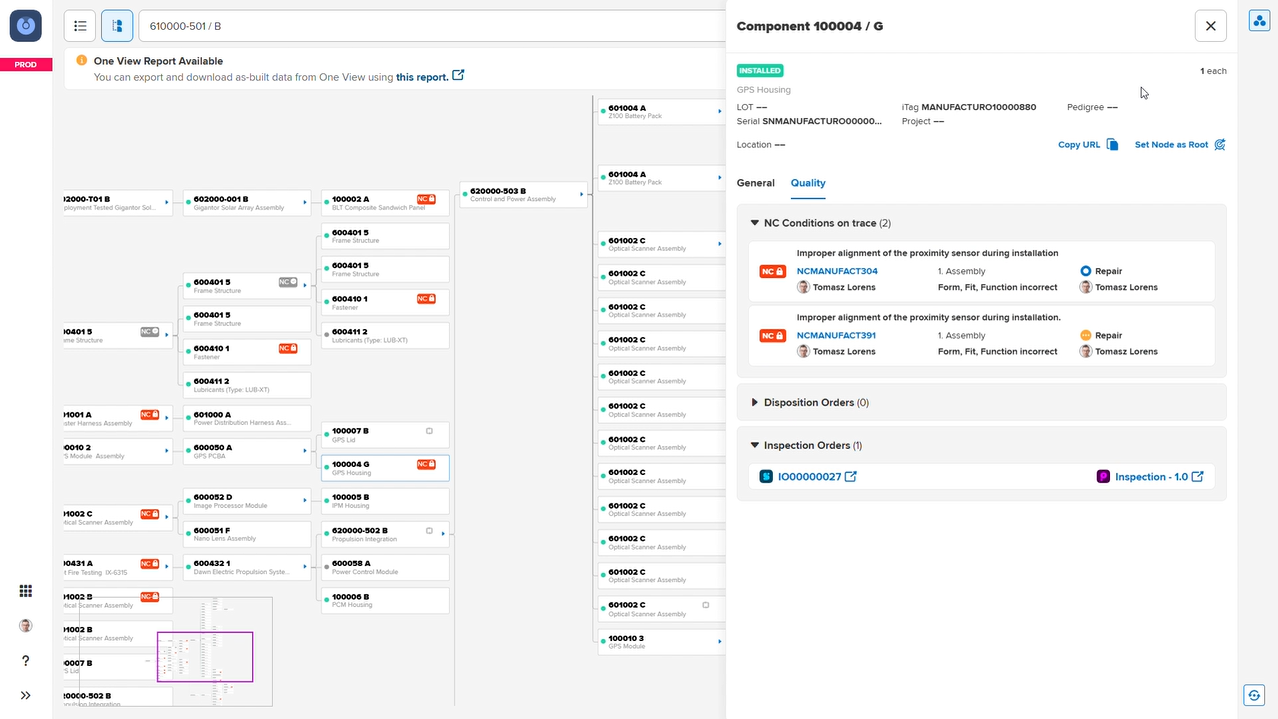
One View, Manufacturo's traceability application, displays nonconformance events as part of the product's genealogy record. Once a defect is resolved, it no longer blocks production, but the record of what happened remains visible in One View's quality tab for full traceability.
Incoming inspection helps managing parts that came from an outside supplier
If manufacturer orders parts instead of making them, say PCB boards, they might choose to perform inspection of every inventory before it reaches shop floor. Incoming inspection is a feature that allows manufacturers to mark that inventory is pending inspection, communicating to other engineers that the parts are here, but are not available for use until the inspection is done.
Then, a dedicated inspection order is created and assigned to an inspector, who works through a predefined digital checklist, for example, checks voltage, and looks for physical damage, then documents their findings directly in the system.
If the inventory passes, it's released to warehouse and available for production. If any of the parts fail, they're flagged as nonconforming and returned to the supplier for replacement or repair. The replacement parts go through the same inspection process before being released.
In Manufacturo, incoming inspection is handled by the Inventory Operations application. One View displays the inspection order and its outcome under the quality tab of the relevant inventory item, giving manufacturers a clear record of what was inspected, by whom, and when.
Remove and replace tracking lets you perform changes on previously nonconformed parts
Remove and replace tracking is a feature within traceability software that logs any changes made to the final assembly, for example, due to the nonconforming part. In case of a replacement, it logs which part was removed, which part was installed in its place, and when the swap occurred.
Sometimes it is better, or cheaper, to fix the nonconforming part rather than replace it. If that is the case, a repair or rework order can be created separately. The part is then locked in the system while the repair is underway, and every step is tracked with the same sign off and qualification requirements as regular production.
Whether the part is repaired or replaced, the action becomes part of the assembly's permanent genealogy record.
One View stores the record of every removal or replacement as part of the assembly's permanent genealogy record.
Genealogy and work order tracking gives you full visibility into the components used
Genealogy tree visualizes all the components that were used to assemble the final product, from multiple levels of sub-assembly. In case of a product recall, this feature tracks the exact serial number of the faulty part which points to where the faulty part came from before reaching the assembly line.
In Manufacturo, genealogy tracking is handled by the One View application, which also includes a dedicated tab that shows all quality events tied to that assembly, including defects that were reported, disposition orders that were created, repairs that were carried out, and inspections that took place.
Which manufacturing industries need traceability software?
In industries that produce machines made of hundreds or even thousands of components, traceability software is essential in minimizing the risk of failure and managing the complexity of the process. Aerospace, space, medical, and automotive industries all require appropriate systems in place, due to strict compliance standards, such as AS9100.
For these manufacturers, traceability also supports research and development and allows them to iterate the prototyping process. If a component fails during testing, the team is able to track down where the failed part was made and determine how to prevent it from happening again.
Manufacturing traceability and Industry 4.0
Industry 4.0 is about digitization, as well as implementing Internet of Things into manufacturing, which brings connected machines and systems together on the shop floor. Modern traceability systems collect data from different machines across the shop floor, integrate with ERP systems, and broadcast completion events to other systems as they happen.
That constant flow of structured data makes traceability software one of the richest data sources in a manufacturing environment.
Traceability software and recalls
Rather than citing a specific case, which I cannot do for confidentiality reasons, I will walk through three hypothetical scenarios that illustrate how traceability software affects the outcome of a product recall. Examples include a satellite failure, damage during storage, or a faulty catalytic converter reaching the market.
Example 1: Faulty screw in a satellite
A satellite failed in orbit and crashed. After discovering the remains, the team realized that one of the screws was faulty and should be reworked when assembling the next satellite. With a proper traceability software in place, manufacturer was able to track down the exact supplier that delivered that screw and pursue compensation.
Example 2: Engine got damaged during storage
The manufacturer assembled a rocket engine. A complete working engine was placed on the shelf until the rest of the components were ready for assembly. However, during storage, the shelf collapsed and the engine fell to the ground, which left a small crack in the casing. With defect management, the manufacturer was able to prevent that engine from being shipped to the assembly.
Once the engine was fixed, the nonconformance record stayed permanently attached to its serial number, so if that crack became a problem in the future, the full history of what happened, what was decided, and who signed off was still there.
Example 3: Catalytic converter was released to the public
A car manufacturer released a new model worldwide; however, they soon discovered that their catalytic converter was faulty and were forced to issue a product recall. With proper traceability software in place, they were able to see where the faulty converter was made, trace it forward, identify which cars it had been installed in, and what other unsold cars had already had it. On top of that, the software applied a system-wide block to prevent the faulty converter from being used in any active or future work order until the issue was resolved.
Compliance standards manufacturing traceability software supports
Manufacturing traceability software helps hi-tech manufacturers meet standards such as AS9100 (aerospace) or ITAR.
Standard | Industry | Traceability Requirement |
|---|---|---|
Aerospace, Space, Defense | Full visibility of raw materials, processes, and parts from source to delivery, with complete traceability of all manufacturing processes | |
Defense, Government Contracts | Complete log of who accessed defense-related technical data and manufacturing records, and when | |
Dual-use Commercial and Defense | Records of controlled components, their origins, and shipping destinations must be maintained and available to regulators | |
Defense, Government Contracts | Audit logging, access control evidence, and accountability across 110 controls, including tracking who accessed production data, from where, and when |
Business benefits of implementing traceability software
The pattern I have noticed is that manufacturers who implement end-to-end traceability software spend less time on compliance-related rework, organize their production better, and resolve nonconformances faster when they occur.
Preventing product recalls
The biggest benefit of having traceability software for manufacturing is the ability to prevent a nonconforming part from being accidentally used in production. Once the part is flagged, the software prevents it from being installed in any work order regardless of who picks it up or which shift is running. That system-level enforcement translates directly to fewer defects in the final product and fewer recalls after delivery.
Faster time-to-market
With traceability software, manufacturers have real-time visibility into their production process, catch defects earlier, and resolve them before they affect downstream work orders. By preventing production emergencies that cause delays, manufacturers can deliver finished products faster and more consistently. Also, digitizing the production process means that technicians and engineers spend less time on paperwork and more on actual production.
Reduce compliance cost
With work orders and quality records organized into a genealogy tree, manufacturers can present their documentation during compliance inspections without having to dig through records scattered across spreadsheets and paper files.
How Manufacturo's One View simplifies product traceability
One View is Manufacturo's traceability module that consolidates production, inventory, and quality data into a single genealogy record for every assembly. It gives manufacturers real-time visibility into what was built, how it was built, where every component came from, and what changed along the way, across multiple facilities and across the entire product lifecycle, from first assembly to post-delivery maintenance.
The result is one connected view of an assembly rather than separate production, inventory, and quality records.
Real-time assembly visibility and completion tracking
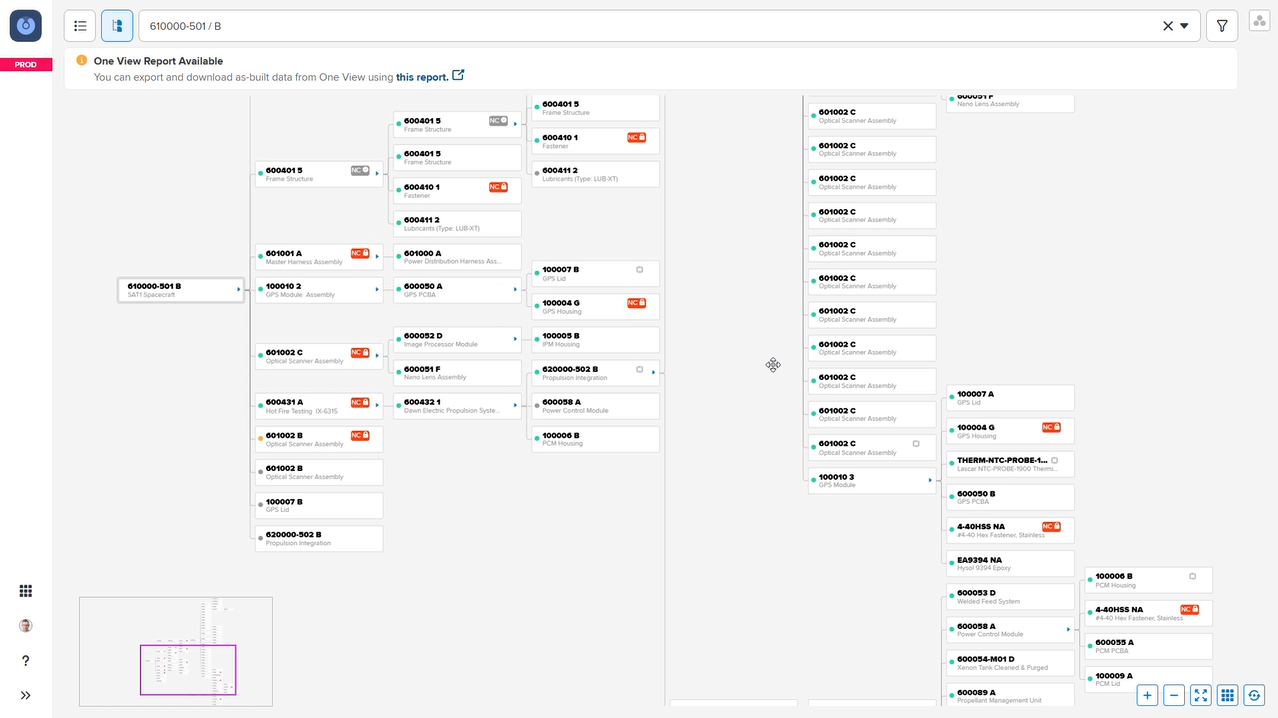
One View gives manufacturers full visibility into how their assemblies are built, ensuring that they match their original design. One View visualizes all subassembly levels to help manufacturers understand exactly what parts were installed, track those that were added through redlines, monitor assembly progress in real time, and review any non-conformances or disposition orders.
Multilevel, multisite as-built genealogy
For manufacturers building complex products across multiple facilities, One View maintains a complete as-built genealogy record that follows the product regardless of where it was built. The history of every component stays in the records, even if that component was assembled in one facility and shipped to another for further integration.
Manufacturers can navigate that genealogy from the top level down to individual serial/lot numbers, or work from the bottom up to quickly identify where a problematic component was used.
Containment and recall scope
In case of having to investigate the nonconforming part, One View lets manufacturers search by serial number, lot number, work order number, or product code. Then, they can navigate the as-built genealogy from the bottom up, starting from a single component and trace a specific part forward through every assembly, work order, and inventory location where it appears.
Engineering change management: Redlines, ECN, and mBOM reconciliation
One View tracks every engineering change made during production through Redlines, creating a permanent record of what was modified, who approved it, and when it took effect.
Manufacturers can compare the as-designed structure against the as-built genealogy to detect deviations and understand exactly where the final product diverged from the original plan. For manufacturers doing iterative research and development, where process plans evolve mid-production and changes require multi-person approval before work can continue, that reconciliation record is essential for both quality control and compliance documentation.
As-maintained genealogy across the product lifecycle
One View provides a holistic view of the entire as-built history of a product, including a point-in-time view of its state at any moment in its lifecycle. Every person and every action taken on a component is tracked to the exact second, giving manufacturers forensic-level traceability when investigating a field failure, supporting a warranty claim, or preparing documentation for a customer audit long after the original production records were created.

If you’re looking for an all-around tool that was designed for complex manufacturing processes and has traceability in its DNA, read a detailed description of our One View module.
Or, schedule a free demo with one of our consultants to find out how Manufacturo can help you with traceability and more.
Traceability software for manufacturing: a summary
Effective traceability software is a system that tracks and logs every action and task performed on a part throughout the manufacturing process, such tasks that were done to it, engineers that worked on it and potential repairs and replacements. This helps manufacturers visualize their processes, become compliant with industry standards, and better manage potential product recalls. Manufacturo is a comprehensive system, that comes with a traceability application, called One View, that tracks any changes and tasks done to parts that were repaired and reworked.
Frequently asked questions about manufacturing traceability software
It is a system that tracks materials, parts, and products, individually or by lot, through every stage of manufacturing and into the supply chain, so manufacturers can prove compliance and run fast recalls.
It captures data at each production stage (raw material intake, assembly, testing, shipping) via barcode, RFID, or direct entry, then links that data into a single as-built genealogy record per unit or lot. If there’s a defect in your part, software solution like Manufacturo tracks if you have a trace in your system that a repair took place.
No — while aerospace, medical device, and automotive manufacturers face the strictest mandates, any manufacturer benefits from traceability for warranty claims, cost control, and quality improvement.
Yes. Manufacturo supports multilevel and multisite as-built genealogy, so traceability data stays consistent across every facility. You will keep your traceability if your part is being built on multiple plants in different locations.
Yes, traceability features should be included in an MES (manufacturing execution system). Traceability answers where a part came from, who made it, what are this person’s qualifications, where is that parti being shipped. Manufacturo is an example of a manufacturing management software that provides you with such traceability features.